
Seeker's Splendid Settings
A downloadable tool
⚙ Seeker's Splendid Settings
Seeker's Splendid Settings is a modulable, open and robust Setting Framework for you to use in your Godot projects. Fully commented and easily expandable, you will never have to develop a Setting System again (I sure wont) !
The core Framework is FREE, and the production-ready Presets is PAID (but not much, it's like 2 bucks)
💻 Features - Framework
The core framework of Seeker's Sweet Settings is open and free for all ! Check out LICENSE_FRAMEWORK.txt !
- Settings saving and loading in a .cfg file
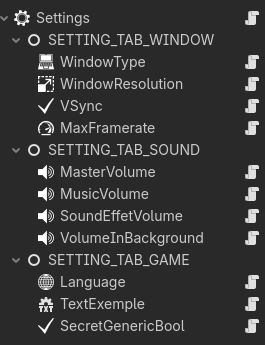
- Define your settings in the Godot editor, using the Scene editor and a Section -> Setting Key architecture
- 6 setting types for all of your needs, with specific customizables options :
- Boolean
- Range
- Number (same as Range but display a SpinBox instead of a HSlider)
- Text
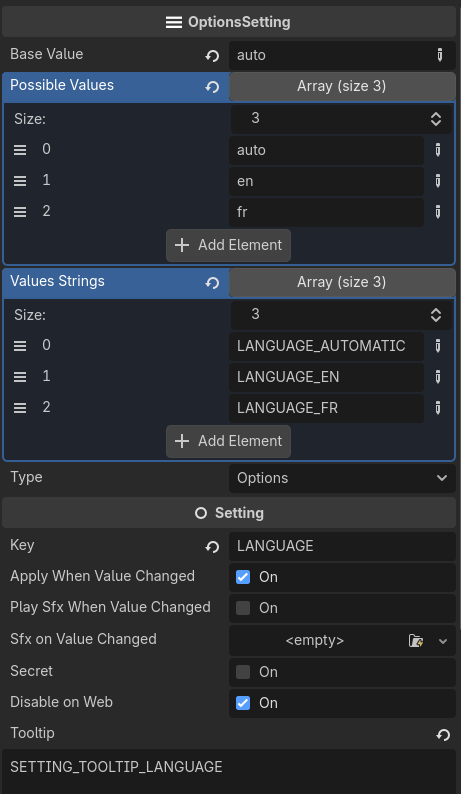
- Option List
- Keybinds/Inputs
- Many Quality of Life Options for easier developement and debugging :
- Global Toggle : Disable file reading, loading and writting. No interaction with the file are made !
- Global Toggle : Disable settings on web. Free the settings node, which can create side effects in your code ! Be wary !
- Global Toggle : Flush/Reset saved settings on load to default value (useful during development)
- Global Option : Blacklist sections saving by name. Let's say you don't want to commit a certain section to file, you can blacklist it !
- Setting Toggle : Disable setting on the web
- Setting Toggle : Secret Settings (not appearing in the UI but still modifiable by file modification)
- Per Setting Toggle : Instant application of the setting when modified
- Setting Option : Play a sound when the setting value is changed
💹 Features - Presets
The preset pack come with additional content to let you save time ! This pack is paid (2€) and comes with another license. Check out LICENSE_PRESETS.txt
- Auto generated UI, reactive to any changes you make to your settings. Don't bother hardcoding your setting screen anymore !
- Individual UI Scene for each setting type
- Easily expandable with a modular architecture
- Reset to default button in UI.
- Various settings, already functionals :
- 🔊Volume Slider for Master, SFX & BGM. Make sure you have bus name "SFX" & "BGM" for it to work !
- 🔊Volume Attenuation Slider when losing focus
- 🖥️VSync toggle
- 🖥️Window Mode - Windowed, Fullscreen, Borderless Fullscreen
- 🖥️Resolution - 320x180, 640x360, 1280×720, 1600×900, 1920×1080, 2560x1440, 3200x1800, 3840x2160
- 🖥️Maximum FPS - 30, 60, 120, 144, Uncapped
- 🌐Language Picker with French and English preset (you will need to bind it to your own localization handler or use mine (coming soon !))
- Translation Strings in a convenient csv file for all the settings UI.
Custom Icons for custom settings. MORE READABILITY !
Some examples of autogenerated UI and theme combinations :
 All the autogenerated settings type with no theming applied.
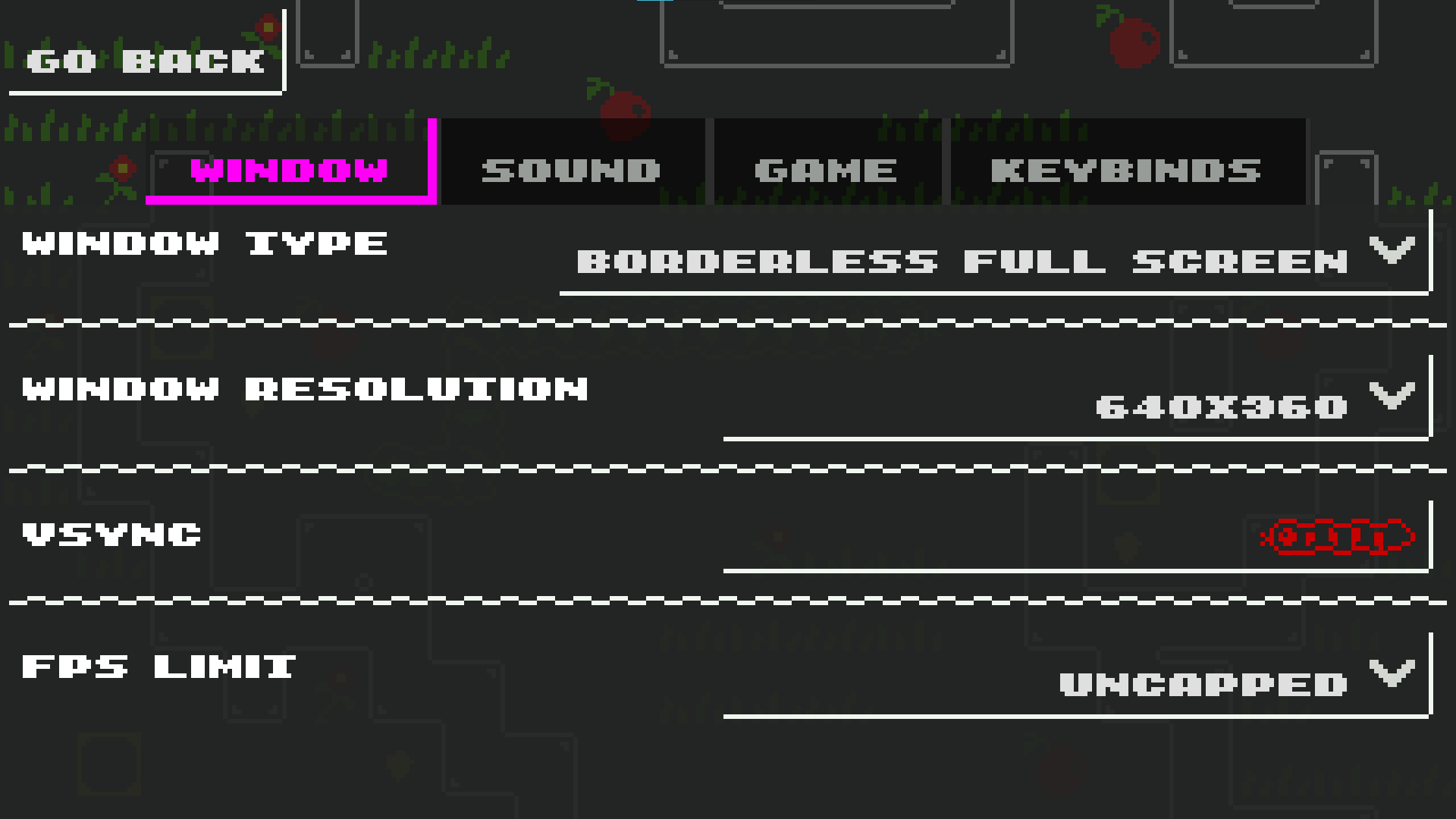 The Autogenerated Settings being used in Snekoban, with heavy theming applied using Godot's theme property.
 The Autogenerated Settings being used in Fishook, with slight theming applied using Godot's theme property.
🎯 Why should I use this ?
- Godot beginners - Learn from clean, documented and organic code made with NO AI.
- Game jam developers - Drop the presets in and be done with it !
- Professional developers - Want an easily extensible and customizable framework for your settings ? This is it.
- Solodevs - Save hours of development time with automatic UI Generation !
💻 Requirements
- Godot Engine 4.6+
- If you're using the Presets : Audio Bus Layout with buses named: Master, BGM, SFX
📜 License - Framework
The license for the framework is GPL-v3 ! Full info in LICENSE_FRAMEWORK.txt
- ✅ Commercial use allowed - Use in free or paid games
- ✅ No attribution required - Credit appreciated but not mandatory
- ✅ Modify freely - Extend and customize as needed
- ✅ ShareAlike - You can share freely or sell your own expansion of the framework if the license stays the same.
📜 License - Presets
The license is a custom one. Full info in LICENSE_PRESETS.txt
- ✅ Commercial use allowed - Use in free or paid games
- ✅ No attribution required - Credit appreciated but not mandatory
- ✅ Modify freely - Extend and customize as you desire
- ✅ Lifetime updates - Bug fixes and improvements included
- ❌ You cannot share the source code.
⚠️ Important Notes
- Audio buses must be named exactly: "Master", "BGM", "SFX" for automatic volume control to work.
- Resolution changes only apply in Windowed mode. Fullscreen uses native display resolution.
- FPS Capping doesn't do anything if VSync is on.
🚀 Quick Start - Framework
- Open project in Godot 4.6+
- Enable Settings.tscn as an autoload in the Project Settings. It should be named UserSettings
- Enable inputs/input_settings.gd as an auload in the Project Setting. It should be named InputSettings
- Start defining your settings inside Settings.tscn !
🚀 Quick Start - Presets
- Open project in Godot 4.6+
- Enable Settings.tscn as an autoload in the Project Settings. It should be named UserSettings
- Enable inputs/input_settings.gd as an auload in the Project Setting. It should be named InputSettings
- Set up Audio Bus Layout (Master → BGM, Master → SFX)
- Run settings/ui/SettingScreen.tscn to test
- Integrate settings/ui/SettingScreen.tscn into your game
🐛 Bug Reports
If you ever encounter a bug or want to discuss the project, please put a comment on itch.io or message me on my discord : https://discord.gg/YjnMFebQxq !
Thank you in advance
Download
Click download now to get access to the following files:
Development log


Leave a comment
Log in with itch.io to leave a comment.